About ABB CP400 HMI
ABB CP400 HMI
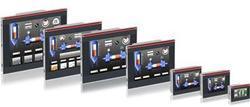
The CP400 series offers highly efficient and effective functionality such as alarm and event management, graphics, animation, macro and Ladder Diagram functionality and recipe management. The range is available from a compact 3" monochrome version up to a large 10.4" color TFT display. RS232 & 485 Modbus are standard communications options across the whole range with Ethernet being available on most products. Other options include Ethernet plus CF Memory card slots and USB ports. Most models are available in either STN or TFT screen format.
Hot IP Swap functionality: the panel will switch transparently from one PLC to another in the event of communication loss, with the active PLC ensuring a better sustainability of your installations and offering a permanent operational system. Available on the panel Ethernet version, this function is standardized for the whole range and is easy to configure with direct IP address-changing. Users can also manually select their own communication channel directly on the display. By creating a single program that you can duplicate on several PLCs, you will save memory and development time.
CP400 HMI
- CP410M
- CP420B
- CP430B
- CP440C-ETH
- CP450T
- CP450T-ETH
- CP415M
- CP430BP
- CP435T
- CP430BP-ETH
- CP430T
- CP430T-ETH
- CP435T-ETH
CP400 HMI Software
CP400 HMI Cables
- TK401
- TK402
- TK403
- TK404
- TK405
- TK406
Intuitive Touchscreen ControlThe ABB CP400 HMI offers effortless management of industrial processes with its responsive 5.7-inch resistive touchscreen. Users can easily navigate menus and controls, making it suitable for operators in demanding factory environments. The panel's multi-language support and password protection add layers of usability and security, further streamlining on-site operations across a wide range of industrial applications.
Durable and Reliable for Industrial EnvironmentsDesigned with industrial needs in mind, the CP400 boasts IP65 front protection, allowing it to withstand dusty and wet conditions during operation. It runs reliably within a -10 to 40C temperature range and features an LED backlight for long-lasting visibility. Its tough plastic enclosure and panel mount installation make it a steadfast component in automation setups, reducing downtime due to its rugged build.
Seamless Integration and ConnectivityIntegrating the CP400 into an industrial automation system is straightforward, thanks to its support for Ethernet, RS232/RS485 communication, and a dedicated USB programming port. Programmers and operators alike benefit from the easy connection to other devices, enabling quick configuration and data exchange using the intuitive Panel Builder 400 software.
FAQ's of ABB CP400 HMI:
Q: How do I program the ABB CP400 HMI?
A: You can program the ABB CP400 HMI using the Panel Builder 400 software, which allows you to design and modify operator screens. Simply connect your PC to the device via the mini-USB programming port and follow the software instructions to download your application.
Q: What are the main benefits of using the ABB CP400 HMI in industrial automation?
A: The CP400 offers a clear color display, reliable touch control, password protection, and multi-language support. Its robust construction, along with diverse connectivity options, ensures efficient and secure control in various industrial environments.
Q: Where can the ABB CP400 HMI be installed?
A: The HMI is designed for indoor industrial automation settings, particularly where panel mount installation is preferred. With its IP65-rated front panel, it is ideal for areas exposed to dust and water splashes, such as control panels in factories and processing facilities.
Q: What is the operating temperature range for the ABB CP400 HMI?
A: The CP400 HMI operates reliably in temperatures from -10C to 40C, making it suitable for diverse ambient conditions commonly found in industrial environments.
Q: Which communication interfaces are available on the ABB CP400 HMI?
A: The device supports Ethernet and both RS232 and RS485 serial communication, allowing seamless integration into existing control systems or networks for data exchange and monitoring.
Q: How can users benefit from the device's multi-language feature?
A: Multi-language support ensures that operators from different linguistic backgrounds can easily interact with the interface, reducing training time and minimizing errors during operations.
Q: What is the typical application process for using the ABB CP400 HMI?
A: To use the CP400, mount it onto a control panel, connect power and communication lines, and program the interface using the supplied software. Once configured, it provides effective control and monitoring for various industrial automation processes.







 Send Inquiry


 Send Inquiry


