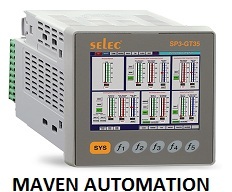
About Selec Graphical Text Display [Flexys GT35]
Graphical Text Display [Flexys GT35]
| Display Types | 3.5 LCD with Touch Screen + 6 Keys (5 user configurable) |
| Size | 99 X 99 mm |
| Digital Inputs | 4 Digital Inputs on Power Supply cards + As per Flexys card selection |
| Analog Inputs | As per Flexys card selection |
| Digital Outputs | As per Flexys card selection |
| Analog Outputs | As per Flexys card selection |
| No. of Slots | 3 |
| RTC with Time Switch function | Available |
| Code Memory | 256K |
| Communication Interface | RS485 based MODBUS RTU Protocol |
| Expansion | Yes |
| Supply Voltage | 180-270 VAC, 50/60 Hz |
| Mounting type | Panel Mount
|
The Flexys GT35 offers a crisp 320 x 240 pixel graphical display on a 3.5-inch LED-backlit TFT LCD, ensuring visibility in varied indoor lighting conditions. Its multi-language support makes it accessible in diverse work settings, while user-friendly membrane keys allow easy navigation and operation. These features deliver a seamless interface for operators across industrial sectors.
Robust Industrial ConnectivityEquipped with RS232, RS485, and Ethernet communication ports, the Flexys GT35 facilitates integration into existing control systems. The flexible connectivity options enable fast data exchange and remote monitoring capabilities. Coupled with its 32-bit processor, the device supports demanding automation tasks in real-time, making it suitable for a wide range of industrial environments across India.
Designed for Reliability and SafetyBuilt with flame-retardant ABS plastic and an IP65-rated front, the GT35 offers durability and protection against dust and water ingress in high-activity industrial spaces. Its panel mounting, wide input voltage range of 24V DC, and low power consumption (<6W) further enhance its operability and safety. The inbuilt buzzer ensures audible alerts for prompt operator response.
FAQ's of Selec Graphical Text Display [Flexys GT35]:
Q: How do I program the function keys on the Flexys GT35 display?
A: The function keys on the GT35 are programmable using the Selec Configurator software. Simply connect the display to your PC via one of the communication ports (RS232, RS485, or Ethernet), launch the software, and follow the configuration steps to assign desired functions to each of the 6 membrane keys.
Q: What are the available communication options for connecting the GT35 to industrial systems?
A: The GT35 provides RS232, RS485, and Ethernet (RJ-45) ports, allowing seamless integration with a wide range of PLCs and SCADA systems. The choice of port ensures flexible connectivity for both local and remote control and monitoring applications.
Q: Where can the Flexys GT35 be installed and what are the mounting requirements?
A: The GT35 is designed for panel mounting in industrial environments. A panel cutout of 118 mm x 92 mm (+1 mm tolerance) is needed. The enclosure's front is IP65 rated, making it suitable for areas exposed to dust and occasional splashes but not for direct exposure to outdoor weather.
Q: What usage benefits does the inbuilt buzzer and graphical display provide?
A: The combination of an inbuilt audible alarm and graphical text display ensures timely user alerts and clear data visualization. This enhances response times and accuracy in monitoring or machine control applications, improving operational efficiency.
Q: When should I use the Flexys GT35 in my automation project?
A: Choose the Flexys GT35 whenever you need a compact, reliable HMI for machine control or industrial automation tasks requiring graphical status updates, multi-language displays, and programmable input keys, especially where panel space is limited and robust communication is needed.
Q: What is the process for integrating the GT35 with my existing automation setup?
A: First, mount the display using the specified cutout dimensions. Connect the necessary communication cable (RS232, RS485, or Ethernet) to your controller or network. Configure the functions and display features using Selec Configurator software, and ensure power supply is set at 24V DC. Once set, the HMI is ready for operation.

![Selec Graphical Text Display [Flexys GT35]](https://cpimg.tistatic.com/04086105/b/4/Selec-Graphical-Text-Display-Flexys-GT35-.jpg)





![Selec Graphical Text Display [Flexys GT35] Share](https://tiimg.tistatic.com/new_website1/design2025/product-details/marketeq_share-alt-5.svg)
 Send Inquiry


 Send Inquiry


