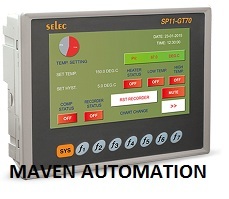
About Selec HMI SP11-GT70
HMI, 7, TOUCH SCREEN [SP11-GT70]
| Display Type | 8 bit colour, LED backlight |
| User Memory | 16 MB |
| Supply Voltage | 18-30V DC |
| Datalogging | 2 GB (External SD Card) |
| Display Configuration | 7" Touch Screen |
| Keys | 7 functions keys + 1 system key |
| Size | 214 x 160 mm |
| Communication | COM1: RS485 Port, Protocol: MODBUS RTU, Configuration: Master |
| COM2: RS485 / RS232 Port, Protocol: MODBUS RTU, Configuration: Slave,(Selectable via Jumper) |
| COM3: RS232 Port, Protocol: ESC/P, Configuration: Serial printer (Slave) |
| COM4: Port: USB, Protocol: USB 2.0, Configuration: Slave |
| Real Time Clock (RTC) | Yes |
Brilliant Display and Touch InterfaceThe Selec HMI SP11-GT70 features a premium 7-inch TFT LCD display, rendering vibrant visuals at 800 x 480 resolution and 65K colors. The 4-wire resistive touch offers reliable input, even with gloves-ideal for industrial settings requiring precision. Its LED backlight ensures clarity and longevity, operating efficiently for over 30,000 hours.
Comprehensive Connectivity and ControlDesigned for seamless industrial automation, this HMI provides extensive connectivity via RS232/RS485, Ethernet, and USB ports. The built-in real-time clock and remote control support enhance process monitoring and management. With its sturdy IP65-rated front and wide -10 to 40C working temperature, it thrives in demanding environments.
Reliable Performance and User-friendly OperationBacked by a 32-bit RISC CPU, generous memory, and proprietary Selec OS, the SP11-GT70 delivers swift processing and stable operation. Programming is straightforward using the Selec HMI Programming Tool, and its automatic control type ensures an intuitive, efficient interaction for industrial operators.
FAQ's of Selec HMI SP11-GT70:
Q: How do I set up the Selec HMI SP11-GT70 for my industrial automation applications?
A: Begin by panel-mounting the SP11-GT70 in your control station, connect power (24V DC) and choose the required communication ports (RS232/RS485, Ethernet, USB). Use the Selec HMI Programming Tool to upload your control logic and interface screens. Follow included manuals or consult Selec's support for detailed instructions.
Q: What are the primary benefits of using a 4-wire resistive touch screen in this HMI?
A: The 4-wire resistive touch technology ensures reliable operation in industrial environments, responding even when users wear gloves or when the surface is soiled. This makes it highly suitable for harsh conditions, delivering dependable input without sensitivity to water or dust.
Q: When should I consider utilizing the remote control feature of the SP11-GT70?
A: You can use the remote control function when process supervision, troubleshooting, or updates need to be handled from a distance. This is highly beneficial for large industrial setups or inaccessible locations, enabling efficient and flexible management of machinery.
Q: Where can the Selec HMI SP11-GT70 be installed and used effectively?
A: The SP11-GT70 is designed for panel mounting, making it suitable for use in control panels across manufacturing, processing, and automation industries. Its IP65-rated front ensures reliability even in areas exposed to dust and water splashes.
Q: What protections does this HMI offer to safeguard my automation system?
A: The SP11-GT70 includes overvoltage and ESD protection, preventing potential damage from electrical surges or static discharge. Its design incorporates a robust plastic enclosure and a long-life LED backlight to promote dependable operation.
Q: How does the real-time clock (RTC) facilitate process control?
A: The inbuilt RTC allows precise time-stamping of process data and scheduling of automation tasks, enhancing traceability and accuracy in process operations, logs, and event management.







 Send Inquiry


 Send Inquiry


